How to Use a Dual-Sided Cutting Mat: Tips for Quilters
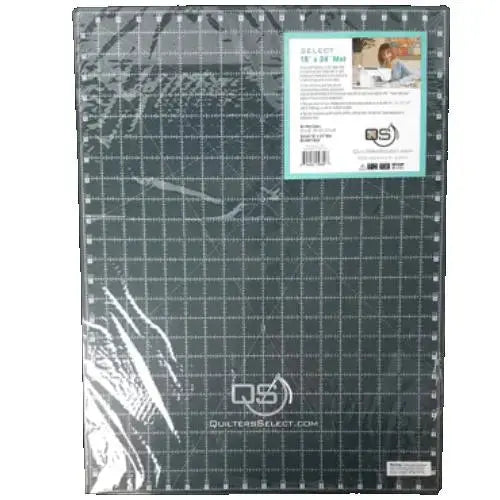
Every accurate quilt starts with an accurate cut, and the surface under your rotary cutter matters. The Quilters Select 18" x 24" Dual Side Cutting Mat is a multi-layer mat designed to be used on both sides, giving you a dependable cutting surface with clear markings whichever way you turn it. At 18 inches by 24 inches, it offers a generous area for trimming blocks, squaring units, and cutting strips, while still fitting most cutting tables.
What Is a Dual-Sided Cutting Mat?
This mat is built in multiple layers and finished with a different background on each face: one side has a light background and the other side has a dark background. That contrast is the whole point. Light fabrics can disappear against a light surface and dark fabrics can be hard to read against a dark one, so instead of squinting or reaching for a second mat, you simply flip this one over. The side you need is always the side facing up.
Why Quilters and Sewists Use It
Quilters use a cutting mat for nearly every project stage: cutting yardage into strips, sub-cutting strips into squares and rectangles, trimming half-square triangles, squaring finished blocks, and cutting binding. The printed grid does much of the measuring for you. This mat carries one-inch lines with two sets of corresponding numbers around the perimeter, reading left to right and right to left. You never lose your place or have to count backwards when you approach a cut from the opposite direction — a small detail that prevents many miscuts. Finer markings at 1/8 inch, 1/4 inch, 1/2 inch, and 3/4 inch, plus multiple angle lines, let you measure and trim precisely without extra tools.
How to Use It, Step by Step
- Choose your side. Place the mat on a flat, stable table. Use the light side for dark fabrics and the dark side for light fabrics, so both the fabric edge and the grid lines stay easy to see.
- Position your fabric. Lay the fabric smooth and flat on the mat, aligning a straight edge or a fold with a printed grid line so your measurements start from a true reference.
- Align your ruler. Set your quilting ruler on the fabric, lining up the ruler's markings with the mat's grid. The one-inch perimeter numbers help you confirm the measurement from either direction before you cut.
- Cut with confidence. Hold the ruler firmly and cut along its edge with your rotary cutter, keeping the blade against the ruler. Use the finer 1/8, 1/4, 1/2, and 3/4 inch markings for small trims and the angle lines when a project calls for angled cuts.
- Check and rotate. For squaring blocks, trim two adjacent sides, then turn the block — or flip the mat to the contrasting side if the fabric is hard to read — and trim the remaining sides to size.
Practical Tips
Work from the numbers, not from memory: because the perimeter numbers read both ways, glance at the set nearest your ruler rather than counting across the whole mat. Alternate sides regularly; using both faces spreads wear evenly and doubles the useful life of the mat. When you are trimming many identical units, align the first one carefully and let the grid and angle lines keep every following unit consistent.
Care and Storage
A few simple habits protect the mat's accuracy. Do not roll it — store it flat so the surface stays true. Avoid exposure to excessive heat, and avoid prolonged exposure to direct sunlight, both of which can damage the mat and distort the surface your measurements depend on. Keep it on your table or stored flat under it, ready for the next session.
Project Ideas
Keep this mat at the center of strip-pieced quilts, where long cuts and repeated sub-cuts reward a clear grid; use it for trimming blocks for samplers and table runners; cut binding strips with the angle lines nearby; and flip to the dark side whenever pale prints, creams, and whites come out of the stash.
Shop the Quilters Select 18" x 24" Dual Side Cutting Mat at Linda's Electric Quilters.