How to Use the Creative Grids Half Rectangle Trim Tool: Tips for Quilters
Half rectangle triangles look simple, but they are trickier than half square triangles. Their angle is different, and if you trim them like a square unit, the points rarely land where they should. This tool helps you cut, line up, and trim accurate units in seven sizes.
What This Tool Is
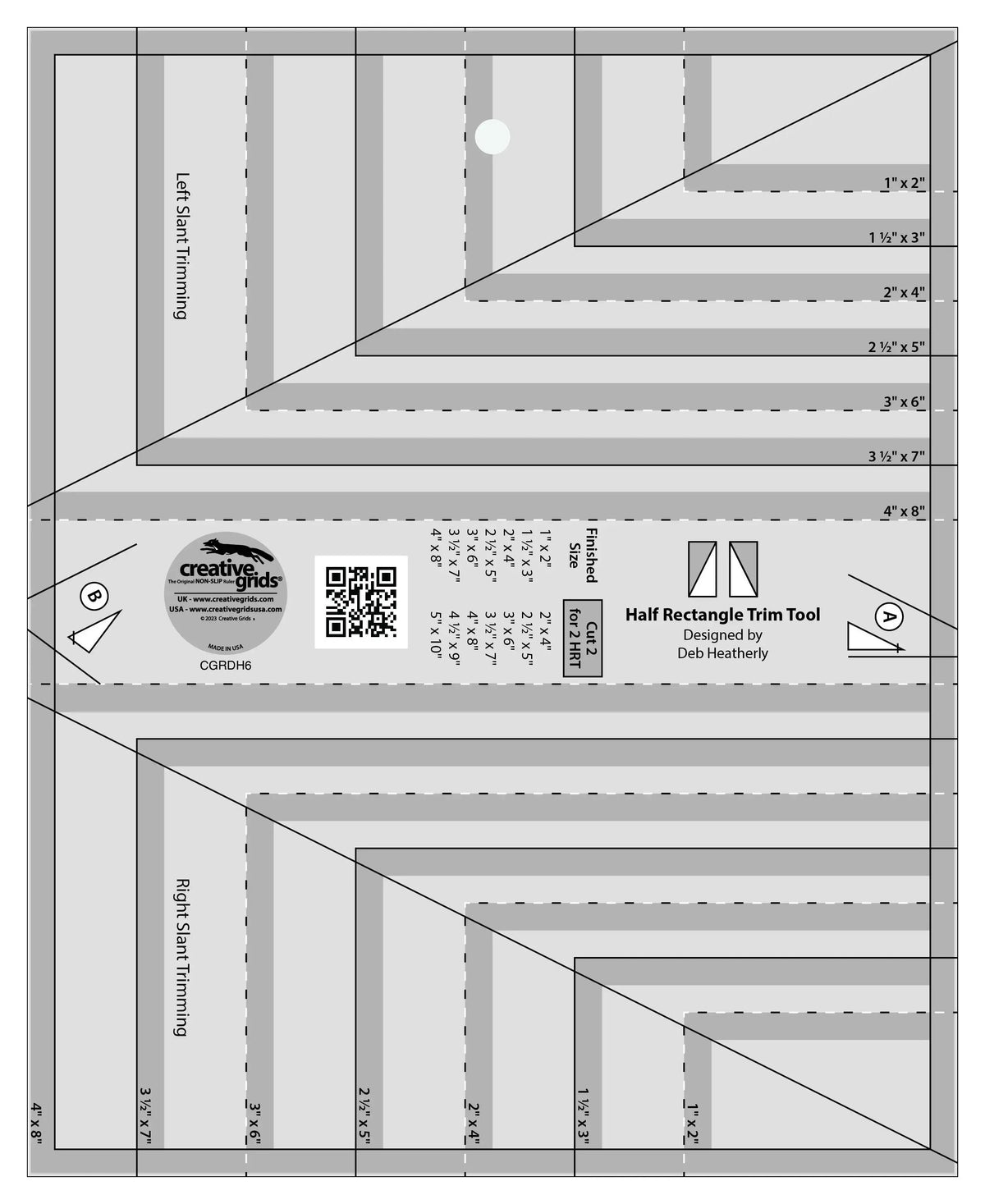
The Half Rectangle Trim Tool from Creative Grids is a ruler-style tool measuring 8-1/2 inches by 10-1/2 inches. It makes half rectangle units with either a right- or left-slanting seam, in finished sizes ranging from 1 inch by 2 inches up to 4 inches by 8 inches. The cutting chart is printed right on the tool, along with trim lines, and the markings are easy to read in black and white. Separate A and B trims help you line up the triangles for sewing. Because half rectangles have a different angle than half square triangles, an extra 1/8-inch indent is added in the final trimming, so when the unit is sewn into a project, the seam lines go corner to corner. It comes with fully illustrated step-by-step instructions, and you can scan the QR code printed on the tool to view a how-to video.
Why Quilters Use It
Quilters use it when a pattern calls for half rectangles and every unit must finish the same size. The printed chart removes guesswork about what to cut. The A and B trims keep triangles aligned before sewing, which matters because a right-slanting unit is not interchangeable with a left-slanting one. The built-in indent accounts for the different angle, so points meet cleanly. The tool slides easily over fabric until pressure is applied, then its exclusive grip holds fabric in place while cutting, eliminating slipping and mis-cuts.
How to Use It, Step by Step
- Choose your finished size. Pick one of the seven sizes, from 1 inch by 2 inches to 4 inches by 8 inches finished, and find it on the cutting chart printed on the tool.
- Cut to the chart. Cut your fabrics to the sizes given in the chart for that finished unit.
- Plan the slant. Decide whether the unit needs a right- or left-slanting seam, and arrange the triangles accordingly. Lay out a block or row first to confirm the slants run the right way.
- Line up with the A and B trims. Use the A and B trims to line up the triangles for sewing, so the offset is correct before you stitch.
- Sew and press. Join the pair with an accurate seam, then press as your pattern directs.
- Trim to finish. Place the tool over the sewn unit, align the trim lines for your size, hold firmly so the grip engages, and trim the excess. The extra 1/8-inch indent is already built in, so seam lines will go corner to corner in the finished project.
- Check the unit. Confirm the trimmed unit measures correctly and the diagonal runs corner to corner before making the rest.
Practical Tips
Make one test unit first and check that the points meet — that catches a reversed slant before you cut a whole quilt. Keep right- and left-slanting units in separate, labeled piles. Follow the illustrated instructions at first, and scan the QR code to watch the video if you learn visually. Apply firm, even pressure when trimming so the grip holds, and use a sharp blade.
Care and Storage
Store the tool flat with your other rulers, away from heat that could warp it, and keep it clean so the markings and trim lines stay easy to read. Keep the instruction sheet with the tool while you are learning the A and B sequence, and avoid dropping it on hard floors.
Project Ideas
Use half rectangle units for chevron and zigzag borders, elongated star points, diamond and ribbon-style blocks, and modern geometric quilts. Smaller sizes suit mini quilts and detailed piecing, while larger sizes make bold table runners, wall hangings, and bed quilt borders come together quickly.
Shop the Creative Grids Half Rectangle Trim Tool at Linda's Electric Quilters.