
Table of Contents
- Manual Mode vs Regulated Mode: The Core Difference
- Stitch Length Consistency: Why It Matters in Longarm Quilting
- Precision Stitch Regulation vs Cruise Mode Explained
- Longarm Ruler Work Stitch Mode: Manual or Regulated?
- Longarm Quilting Stitch Length Settings: Finding Your Sweet Spot
- Free-Motion Longarm Quilting Tips for Both Modes
- Choosing Your Mode: A Practical Decision Guide
- Common Mistakes and Troubleshooting
- Frequently Asked Questions
Last Updated: October 14, 2026
Manual Mode vs Regulated Mode: The Core Difference
The choice between manual vs regulated mode represents two fundamentally different approaches to controlling stitch length on a longarm quilting machine, whether you're tackling edge-to-edge quilting, ruler work, or free-motion designs.
At Linda's Electric Quilters, we work with quilters every day who struggle with this choice. The difference comes down to who controls stitch length: you or the machine.
How Manual Mode Works
In manual mode, you set a constant needle speed and control stitch length entirely through hand movement.
Move the fabric slowly, and stitches bunch together. Move it quickly, and stitches spread out. You have complete control, but that control demands consistency and rhythm.
Manual mode shines when you want absolute freedom: vary stitch length mid-project, speed up for straight lines, slow down for curves, with no machine logic interfering with your rhythm.
The trade-off: stitch length depends entirely on your hand control and consistency. Fatigue, distraction, or a change in your pace will show in your stitching.
How Stitch-Regulated Mode Works
Stitch-regulated mode flips the equation. You set a target stitch length, say, 0.2 inches per stitch.
Move the fabric slowly, the needle speeds up. Move it quickly, the needle slows down. The result: consistent stitch length regardless of your hand speed.
Sensors track quilt movement in real time, so your job shifts from controlling stitch length to controlling quilting direction and design.
Regulated mode removes the burden of maintaining perfect rhythm. It's especially valuable for long projects where fatigue could otherwise affect stitch consistency.
Stitch Length Consistency: Why It Matters in Longarm Quilting
Consistent stitches affect how the quilt sits, how it holds up over time, and how professional the finished piece looks.
Inconsistent stitch length creates visual gaps, since bunched and spread stitches catch light differently. More practically, tight bunches weaken fabric at those points, and loose stitches don't anchor the layers effectively.
Professional quilters and judges evaluate stitch consistency closely.
Regulated mode delivers this consistency automatically; manual mode requires practice to achieve the same result.
For beginners, regulated mode often produces better first results. For experienced quilters, manual mode offers artistic control that regulated mode cannot match.
Precision Stitch Regulation vs Cruise Mode Explained
Most modern longarm machines offer variations within stitch-regulated mode. Two common options are precision mode and cruise mode.
Precision Mode for Detail Work
Precision mode delivers the tightest stitch length control, responding quickly to changes in hand speed and adjusting instantly if you pause.
This makes precision mode ideal for detail work: intricate rulers, tight curves, small design elements. You can slow down without the machine overshooting with long stitches.
Precision mode demands more attention. You're essentially having a conversation with the machine. It responds to every micro-change in your pace.
Cruise Mode for Steady Quilting
Cruise mode maintains stitch length while forgiving hand speed variations. It's designed for steady, continuous quilting: edge-to-edge fills, long straight lines, background work.
It smooths out minor speed changes and keeps stitches consistent across broader movements, making cruise mode less tiring for long sessions.
Many quilters use both modes on the same project: precision mode for detailed sections, cruise mode for background fills.
| Mode | Best For | Stitch Consistency | Hand Control Demand |
|---|---|---|---|
| Precision | Detail work, curves, intricate designs | Very tight | High |
| Cruise | Edge-to-edge, fills, steady lines | Consistent | Moderate |
Longarm Ruler Work Stitch Mode: Manual or Regulated?
Ruler work is the hardest test of any stitch mode because your hand speed changes constantly and often stops entirely. You creep through a corner, accelerate along a straight edge, pause to reposition the ruler, then start again. Each of those transitions is where stitch length goes wrong.
Why ruler work stresses stitch regulation
In regulated mode, the machine reads quilt movement and adjusts needle speed to hold your target stitch length.
Manual mode behaves oppositely: the needle keeps cycling at your set speed whether you move or not. Pause over a corner and you build a visible cluster of stitches in place, which can distort the fabric if tight enough.
Neither behavior is a defect. They are two different failure modes, and knowing which one you are fighting tells you what to adjust.
Matching the mode to the ruler task
- Straight-edge ruler work (long borders, sashing, crosshatch): Regulated mode, cruise setting, is usually the easier choice. Your speed is steady, so the machine has little to correct, and you avoid the fatigue of holding a constant pace by hand.
- Tight curves and small arcs: Precision regulation is the common pick, because it responds fastest to the slow, deliberate movement these shapes require. If your machine's precision mode still overshoots at very low speed, manual mode with a slow needle speed gives you direct control instead.
- Corners and pivot points: This is where mode choice matters most. In manual mode, stop the needle (or lift the foot, depending on your machine) before you pivot so you do not build a stitch cluster. In regulated mode, keep a small amount of continuous motion through the pivot rather than a hard stop, so the machine never has to restart from zero.
- Stitch-in-the-ditch and seam-guided work: Many quilters prefer manual here, because they want to feel the ruler and the seam and adjust pace by feel rather than by a target number.
The pause problem, in both modes
Pauses are unavoidable in ruler work, and handling them is a mode-specific skill:
- Manual: plan your stops. Pause with the needle down at a corner, pivot, then resume. Do not let the machine run while the quilt is still.
- Regulated: avoid long dead stops. If you must stop, stop cleanly and restart with a deliberate, even motion rather than a jerk. A smooth restart is what keeps the first stitch after a pause the same length as the rest.
A practical test before you commit
Before quilting a real border, run this on a scrap sandwich:
- Quilt a 6-inch straight line along a ruler in each mode at your normal speed.
- Quilt a 90-degree corner in each mode, pausing at the turn.
- Quilt a 2-inch circle in each mode, as slowly as you can control.
- Compare the corners first, then the circles. The mode that gives you the cleanest corner and the most even circle is the one to use for that project.
Most quilters find corner behavior, not straight-line behavior, decides the choice: straight lines look fine in either mode, but corners expose the difference.
Machine-specific note
Regulation behavior at pauses and corners varies by machine and firmware version, so two machines with the same mode names can behave differently at a dead stop. Check your manual for how its regulation handles zero movement, and confirm whether you can set a minimum stitch speed or pause behavior. Don't assume another quilter's mode labels mean the same thing on your machine.
Longarm Quilting Stitch Length Settings: Finding Your Sweet Spot
Stitch length preference varies by quilter and project. Common targets range from 0.15 inches (tight, detailed work) to 0.3 inches (bold, graphic quilting).
For edge-to-edge quilting on large projects, many quilters choose 0.2 to 0.22 inches. For ruler work, some go tighter at 0.18 inches.
Test on scrap fabric first: sew a few inches in manual mode, then switch to regulated mode at your target length.
Your machine's manual will specify the stitch length range it supports.
Free-Motion Longarm Quilting Tips for Both Modes
Free-motion quilting demands different skills depending on your mode choice.
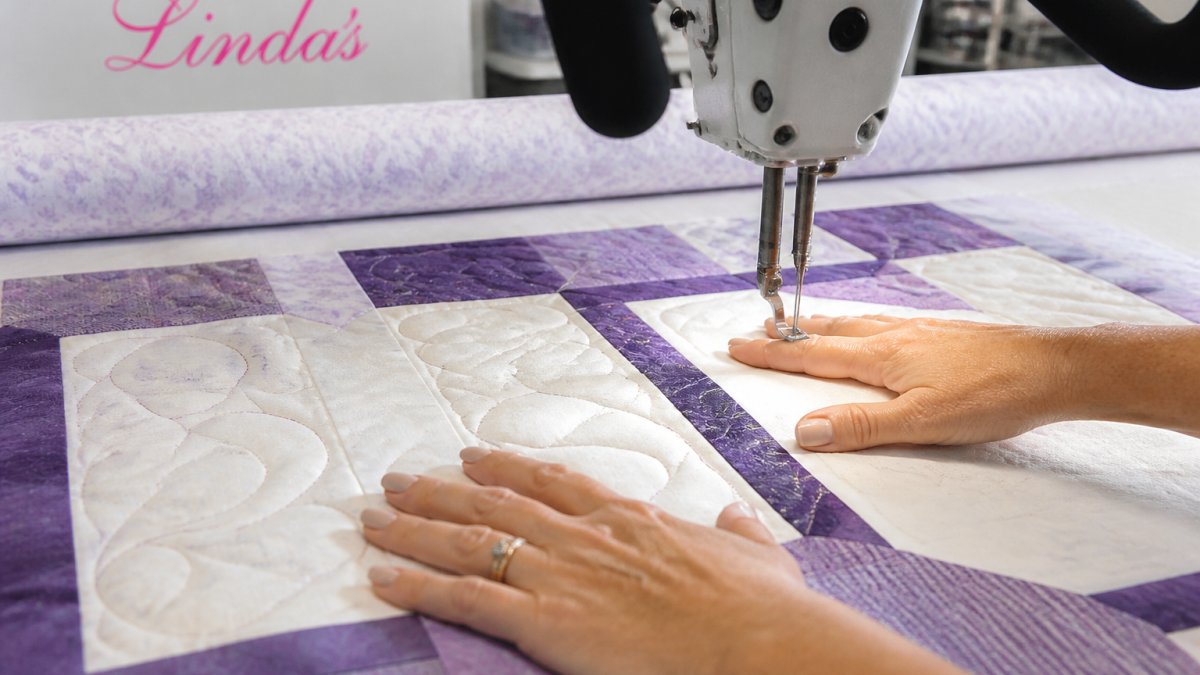
In manual mode, you control everything, and hand speed determines stitch length.
Free-motion in manual mode is like dancing with the machine. You establish a rhythm and stay in it.
In regulated mode, your hand speed becomes less critical. Focus on smooth, confident fabric movement. Let the machine handle stitch length consistency.
Many quilters find regulated mode less intimidating for free-motion work. You can concentrate on creating the design instead of maintaining rhythm.
Whichever mode you choose, practice on scrap sandwiches first to build muscle memory.
Choosing Your Mode: A Practical Decision Guide
Your choice in manual vs regulated mode depends on your skill level, the quilting task, your machine capabilities, and your personal preference.
When to Use Manual Mode
Manual mode works best when:
- You want complete artistic control over stitch placement and length
- You're comfortable maintaining a steady quilting pace
- You're working on projects where stitch length variation is intentional (artistic effect)
- Your machine doesn't have stitch regulation, or you prefer the simplicity
- You've developed the muscle memory and rhythm to execute consistent stitches
Manual mode also appeals to quilters who find automatic adjustments distracting and prefer the feel of direct control.
When to Use Regulated Mode
Regulated mode is the better choice when:
- You're new to longarm quilting and want consistent results quickly
- You're tackling large projects where fatigue could affect stitch consistency
- You need tight stitch length control without constant focus
- You're doing edge-to-edge or background quilting where consistency matters most
- You want to concentrate on design rather than maintaining pace
Regulated mode also suits quilters with arthritis or hand fatigue issues. The machine does the rhythm work, reducing physical demand.
Many quilters use both modes depending on the project. There's no "wrong" choice, only the choice that fits your current needs.
Common Mistakes and Troubleshooting
Mistake: Assuming one mode is always better. Both modes have strengths.
Mistake: Not practicing before starting a project. Switching modes mid-project creates obvious stitch length changes.
Mistake: Setting stitch length too tight or too loose. Stitches tighter than 0.15 inches can weaken fabric.
Troubleshooting: Bunched stitches in manual mode. You're moving the fabric too slowly.
Troubleshooting: Loose stitches in manual mode. You're moving too quickly. Slow down. Practice maintaining a steady pace.
Troubleshooting: Skipped stitches in either mode. Check needle size, thread tension, and needle position.
Frequently Asked Questions
What is the difference between manual and regulated mode on a longarm machine?
Manual mode runs the needle at a constant speed you set, while you control how fast the quilt moves under the needle to determine stitch length. Regulated mode adjusts the needle speed automatically based on how quickly you move the quilt, maintaining consistent stitch length regardless of your hand movement. Manual requires more skill to keep stitches even; regulated mode does much of that work for you.
Should you use manual or regulated mode for ruler work on a longarm?
Regulated mode is generally better for ruler work because it maintains consistent stitch length as you follow the ruler's edge, even if your hand movement varies slightly. Manual mode can work if you move the quilt at a perfectly steady pace, but ruler work demands precision, and regulated mode removes one variable from the equation. Many quilters switch to regulated mode specifically for ruler-guided designs.
Does stitch regulation make longarm quilting easier for beginners?
Yes, regulated mode makes learning easier because the machine handles stitch length consistency automatically. Beginners can focus on guiding the quilt smoothly without worrying as much about matching needle speed to hand movement. Manual mode has a steeper learning curve; you must coordinate both the machine's speed and your hand movement to achieve even stitches, which takes significant practice.
What is the difference between precision and cruise stitch regulation?
Precision mode adjusts needle speed more frequently and responsively to small changes in quilt movement, making it ideal for detailed, intricate designs and tight curves where you need exact stitch control. Cruise mode maintains a steadier needle speed with less frequent adjustments, working well for larger designs, edge-to-edge quilting, and situations where you want a consistent quilting rhythm without the machine constantly recalibrating.
The choice between manual and regulated mode shapes how you approach longarm quilting. Linda's Electric Quilters carries the batting, threads, and notions you need to practice both approaches and find what works for your style. Explore our 700+ educational videos and Crafters Roundtable podcast for guidance from experienced quilters who've mastered both modes. Shop our complete selection of longarm supplies and get started with the right tools for your next project.