
You're halfway through quilting a sandwich when the stitches start shortening, the layers drift, and puckering appears behind the needle. Your first instinct may be to change upper-thread tension. Before you touch the tension dial, check presser foot pressure. The correct adjustment is the lowest pressure that keeps the fabric or quilt stack secure, feeds it evenly, and leaves no drag marks or distortion.
There isn't one correct pressure number for every machine. A Brother model may use 3 for normal sewing, while a Janome model may use 3, 6, or another model-specific baseline. Some industrial machines use a spring-regulator dimension or a measured force instead of a consumer dial. Start with your machine's documented setting, test the actual project layers, and change pressure only when the fabric's behavior tells you to.
Why Presser Foot Pressure Matters More Than Most Quilters Realize
Pressure and thread tension solve different problems. Thread tension balances the upper thread and bobbin thread, while presser-foot pressure controls how firmly the foot holds the fabric against the feed dogs. If a quilt sandwich puckers, changing tension may leave the underlying feeding problem untouched.
A better diagnosis starts with the fabric. Place the same batting, backing, seams, stabilizer, and top fabric you'll use in the project under the foot. Lower the foot, sew a short test seam, and watch the material. If the stack drags, compresses, or develops uneven stitch length, pressure may be too high. If layers lift, shift, or fail to advance consistently, pressure may be too low.
Working rule: Use the minimum effective pressure, not the maximum pressure that forces the layers to stay in contact.
High pressure can impede feeding, mark delicate fabric, or distort a stretchy surface. Low pressure can let the fabric float above the feed dogs, causing shifting, inconsistent stitch formation, or skipped feeding. Neither symptom automatically proves that pressure is the cause, so treat the dial as one part of a controlled diagnosis rather than a universal fix.
The short test that saves a project
Use this sequence before changing settings on the finished quilt:
- Recreate the stack. Include the actual batting loft, backing, stabilizer, seam intersections, and presser foot.
- Record the baseline. Write down the machine setting, foot type, needle, thread, and stitch length.
- Sew a short sample. Check both straight-grain and cross-grain movement when the project involves quilting or multiple layers.
- Change one variable. Move pressure in a small increment, then sew another sample.
- Choose the lowest successful setting. The test should show even stitch length, secure feeding, and no visible compression marks.
Factory pressure is often suitable for ordinary fabrics. Brother's guidance says pressure generally shouldn't be changed unless feeding is poor, and it recommends returning the control to the normal setting after testing in the applicable setup. That habit prevents you from carrying a special-purpose setting into your next project without realizing it.
If you're preparing a larger quilt, shop for the correct batting and quilting materials before testing. The batting's loft and surface can change how the stack responds under the foot.
How the Pressure Mechanism Actually Works
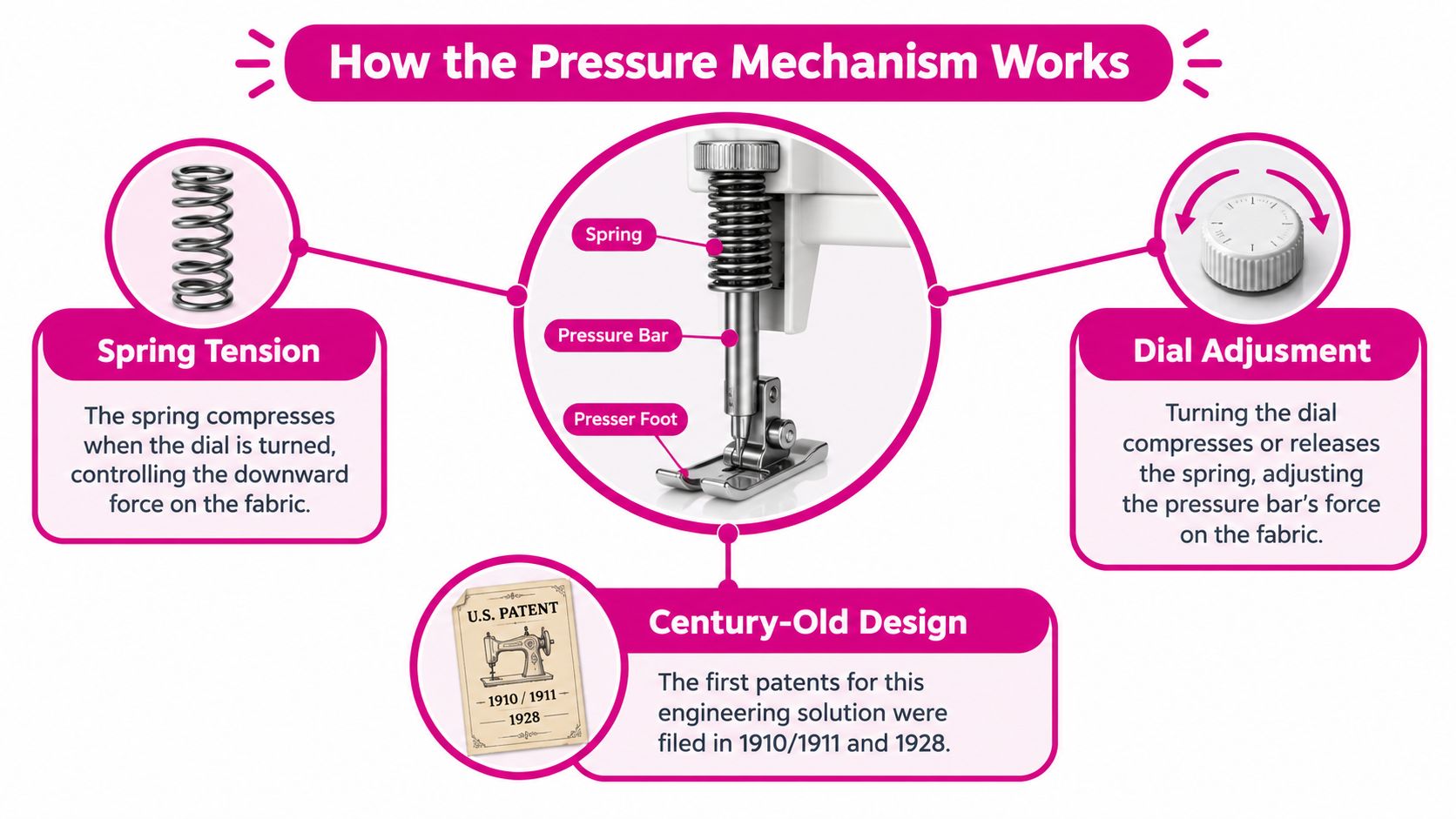
Inside a typical sewing machine, the presser foot connects to a spring-loaded pressure bar. The spring presses downward, the bar transfers that force to the foot, and the foot holds the fabric against the feed dogs while the feed mechanism advances the material.
Turning a mechanical regulator usually changes spring compression. More compression creates greater downward force. Releasing compression lowers the force. On some machines, the adjustment appears as a screw or dial. On others, it appears in a digital menu. The control may look simple, but the result depends on foot geometry, feed-dog height, fabric thickness, and the way the foot contacts the surface.
Why the history still matters
Pressure adjustment has been a sewing-machine engineering problem for more than a century. A U.S. patent filed on November 21, 1910, and granted on May 9, 1911, described an adjustable screw intended to make presser-foot pressure easier to control when sewing materials of different thicknesses. The patent identified difficulty adjusting pressure for varying goods as an existing machine problem, not a modern luxury. You can review the original 1911 adjustable presser-foot pressure patent.
A 1928 patent later described a spring member incorporated into a presser foot that could respond when excessive pressure was released. The engineering changed, but the practical question stayed familiar: how can the machine hold the material securely without preventing it from moving?
That history gives quilters a useful perspective. Pressure belongs beside stitch length, needle selection, thread tension, and foot choice during setup. It isn't a magic number, and it isn't interchangeable between brands. Consumer dials are convenient reference scales, not universal measurements of force.
Adjusting Pressure on a Domestic Sewing Machine
Start with the machine's manual, not a setting copied from another brand. Look for a pressure regulator near the top of the machine, above or near the needle-bar area, or find the pressure option in the machine's digital menu. Some models use a screw, while others use a numbered dial.
Put the actual fabric stack beneath the lowered presser foot. Don't test a quilt sandwich with a single scrap of cotton if the finished project includes batting and seams. The foot should rest on the material in the same way it will during sewing.
A controlled domestic-machine procedure
- Return to the normal baseline. Use the factory or manual setting for regular sewing.
- Lower the foot onto the stack. Adjusting with the foot raised doesn't show the working pressure.
- Sew a short seam. Use the intended needle, thread, stitch length, and foot.
- Read the result. Look for layer shifting, drag, puckering, uneven stitches, and compression marks.
- Change pressure slightly. Bernette guidance specifies clockwise adjustment to increase pressure and counterclockwise adjustment to reduce it.
- Test again. Stop when the stack feeds securely with the least downward force.
- Record and restore. Document the successful setting, then return to the normal baseline when the special project is complete.
Never force the regulator beyond its mechanical stop. A Bernette manual warns that excessive loosening can remove the screw, while excessive tightening reaches a bottom limit. If the adjustment feels jammed, turns without changing pressure, or produces unusual resistance, stop and consult the machine manual or a qualified technician.
Typical pressure settings by brand
| Brand / Model | Normal Setting | Lightweight Fabric | Heavy or Bulky Layers |
|---|---|---|---|
| Brother computerized model | 3 | Reduce only if feeding is poor | Increase only if the stack fails to feed smoothly |
| Brother coverstitch guide | 2 | Reduce when thin fabric feeds poorly | Use the manual baseline and test bulky layers |
| Janome models | 3 or 6, depending on model | Reduce for delicate or stretchy materials | Test an increase only when the layers slip or fail to advance |
These settings come from different machines and aren't transferable standards. Brother's published guidance identifies 3 as normal sewing on one computerized model, while its coverstitch guide identifies 2 as normal for that setup. Janome documentation includes models with 3 for regular sewing and another with 6, which is exactly why symptom-led testing is safer than copying a number.
For a machine with adjustable pressure, the Husqvarna Viking ONYX 25 sewing machine is one example of a domestic setup where pressure can be matched to the project rather than treated as fixed.
Working With Quilting Feet and Longarm Hopping Feet
A walking foot, dual-feed foot, and longarm hopping foot don't create the same feeding relationship. Moving between them without changing your test method is a common source of confusion.
A walking foot adds upper-feed assistance. It helps move the top fabric with the feed dogs, which can reduce layer shifting in quilting and bulky seams. A dual-feed foot uses a similar idea through an integrated or attached feed mechanism. On one Brother model, installing the dual-feed foot with its roller lowered fixes the pressure at 2, showing that the machine's foot configuration can change the pressure behavior.
A quilt sandwich often needs less downward pressure than a single heavy fabric. More force can drag the stack, compress batting, or make the quilt harder to guide. The walking or dual-feed mechanism may be the correct solution when the problem is layer movement, not a lack of downward force.
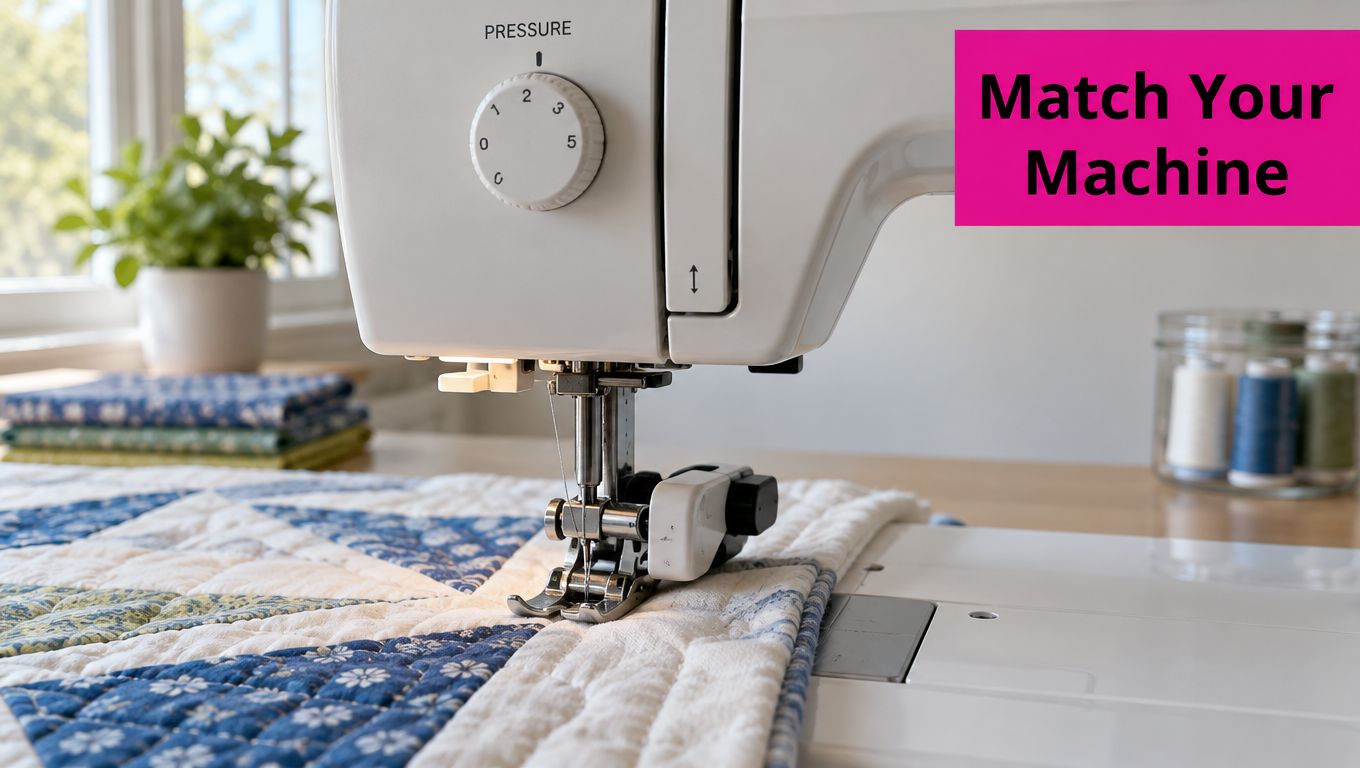
Domestic feet and longarm feet behave differently
A longarm hopping foot moves with the needle cycle and maintains a controlled relationship with the quilt surface. The pressure spring lives in the presser-bar assembly, not necessarily on a consumer-style top dial. Foot height, hopping-foot clearance, quilt loft, and presser-bar condition all influence how the sandwich moves beneath the needle.
On a Gammill or Innova, a pressure concern may point to the presser bar or related parts rather than a number on a dial. Linda's Electric Quilters offers Gammill presser-bar parts and quilting supplies as one option for owners checking a worn or damaged assembly.
For longarm setup, test the machine with the quilt loaded. Check whether the foot compresses the surface, whether the layers flag or shift, and whether the stitch length stays consistent as the machine travels across seams. A longarm hopping foot that sits too low can create drag. One that sits too high can allow the layers to move beneath it.
A Fabric-by-Fabric Pressure Guide
Fabric structure gives you a starting point, but symptoms decide the final adjustment. Janome guidance recommends reducing pressure for appliqué, embroidery, basting, and delicate materials. It identifies settings as low as 1 for chiffon, lace, and organdy on one model, and 1 for very stretchy velour and knits on another. Treat those values as model-specific test points, not universal instructions.
| Fabric structure | What you may see | Pressure direction to test | Check before changing pressure |
|---|---|---|---|
| Lightweight woven | Shifting, skipped feeding, or marks from the foot | Reduce pressure if the foot is compressing or dragging the fabric | Fine needle, stitch length, foot surface, and fabric support |
| Stretch knit | Wavy edges, tunneling, or stretched seams | Reduce pressure gradually | Ballpoint or stretch needle, differential feed, and handling |
| Embroidery on stabilizer | Puckering or restricted repositioning | Reduce pressure for maneuverability | Stabilizer weight, hooping, needle, and embroidery-foot clearance |
| Batting-backed quilt sandwich | Drag, uneven feeding, or compressed batting | Reduce pressure if the stack is being held too tightly | Walking or dual-feed engagement, batting loft, and foot height |
| Bulky seamed layers | Stalling at seams or inconsistent stitch length | Test a small increase only if layers slip | Needle size, foot clearance, seam leveling, and feed-dog contact |
A lightweight fabric doesn't always need the lowest possible pressure. If it lifts away from the feed dogs, a small increase may help. A thick quilt doesn't always need more pressure either. If the stack is dragging, reducing pressure or changing to a walking foot may solve the problem more effectively.
For a visual demonstration, use the embedded tutorial while comparing your own test sample:
Keep a small calibration scrap with the same fabric and stabilizer used in your project. It's more useful than a generic chart because it records how your machine, foot, needle, and materials work together.
Troubleshooting When Pressure Is Not Really the Problem
Quilters often increase pressure because the stitches look uneven. That can make the problem worse when the cause is a dull needle, an unsuitable needle type, incorrect thread tension, inadequate stabilizer, or poor feed-dog engagement.
Use a diagnostic order that eliminates the simplest causes first:
- Check the foot. Confirm that the walking foot, dual-feed foot, hopping foot, or embroidery foot is installed correctly and moving as intended.
- Check the needle and thread. Replace a dull or bent needle, then confirm that the needle suits the fabric and thread.
- Check the feed system. Make sure the feed dogs engage correctly and aren't obstructed by lint or a lowered-feed setting.
- Check stabilization. Embroidery and lightweight fabrics may need a different stabilizer weight or support method.
- Check tensioning. Inspect the upper thread path, bobbin casing, and thread seating before treating every stitch issue as a pressure fault.
- Check pressure last. Adjust only after the other variables are in a known condition.
Separate pressure symptoms from tension symptoms
Pressure affects fabric movement. Tension affects thread balance. A quilt may show puckering from excessive compression, but it may also show puckering because the thread is too tight, the needle is wrong, or the stabilizer is inadequate. Changing pressure won't correct every form of puckering.
JUKI documentation separates upper-feed assistance and presser-foot-height adjustment from pressure control. That distinction matters on a longarm or industrial machine. If the foot height, walking-foot engagement, or upper-feed timing is wrong, turning a pressure regulator may only mask the issue temporarily.
The Brother coverstitch guidance also emphasizes that pressure normally shouldn't be changed unless feeding is poor. If your test seam is even and the project is moving smoothly, return to the machine's normal setting instead of leaving a special adjustment in place.
Recheck pressure whenever the batting thickness, presser foot, fabric construction, or stabilizer changes. A setting that worked on a flat cotton sample may not suit a lofted quilt sandwich or an embroidery design with dense stitching.
Presser Foot Pressure Questions Quilters Ask Most
How do I know if pressure is too high?
Look for drag, compressed batting, fabric distortion, or marks left by the foot. The machine may also struggle to maintain even stitch length because the foot is holding the stack too firmly against the feed mechanism.
Lower pressure slightly and sew another sample. If the quilt advances more smoothly while the layers remain aligned, the earlier setting was excessive.
How do I know if pressure is too low?
Watch for fabric lifting, layer slippage, inconsistent feeding, or skipped feeding. The foot may appear to rest on the stack, but the feed dogs won't move the material reliably if contact is insufficient.
Increase pressure in a small increment, then test again. Stop as soon as the fabric feeds securely.
Do pressure settings transfer between machines?
No. Numbered settings are machine-specific. One Brother model lists 3 for normal sewing, a Brother coverstitch setup lists 2, and Janome manuals identify 3 or 6 depending on the model. Industrial machines may use a spring-regulator dimension or a force range instead of a consumer dial.
Use the manual baseline for your machine, then calibrate with the actual project layers. Don't transfer a setting from a domestic sewing machine to a longarm, industrial machine, or vintage machine.
When is a longarm presser-bar issue the real culprit?
Inspect the presser-bar assembly when the foot no longer maintains consistent clearance, pressure changes have little effect, or the hopping foot behaves differently across the quilt surface. On an industrial JUKI, pressure may be adjusted through a mechanical regulator rather than a consumer dial. One JUKI LU-2828-7 and LU-2828-6 manual specifies an adjustment range from 38 mm to 60 mm, measured from the upper arm surface to the regulating dial, with a 47 mm factory-shipment standard. That dimension belongs to those models, not to every machine.
For Brother's UF-8910/8920 industrial machine, the documented pressure range is 75–120 N, with the operating rule that pressure should be as weak as possible while preventing material slippage. It isn't a universal target for a domestic or longarm machine. Owners who need a replacement can review Linda's Gammill presser-bar options and compare the part with the machine's documentation.
How should I adjust an industrial or vintage machine safely?
First, identify the regulator and locknut described in the machine manual. Loosen the locknut where provided, make a small regulator adjustment, sew a test section, and retighten the locknut once the material feeds securely. Don't turn past the mechanical stop, and don't continue loosening a domestic pressure screw until it risks coming out.
Record the starting dimension or setting before making changes. On an industrial machine, a measured regulator position is more useful than counting turns because one full turn doesn't represent a universal change in force.
Professional habit: Test the finished setup on both straight and cross-grain seams, then document the foot, needle, thread, stitch length, fabric stack, baseline pressure, and final pressure.
Linda's Electric Quilters offers quilting fabrics, batting, threads, notions, machine parts, instructional videos, and live shopping resources for projects that need dependable feeding and accurate setup. Visit Linda's Electric Quilters to choose the materials and presser-bar supplies that match your next quilt, embroidery project, or longarm session.